 Dotta
778e775c35
Dotta
778e775c35
## Thinking Path > - Paperclip orchestrates AI-agent companies and needs secrets handling to work across local development, hosted operators, and governed agent execution. > - The affected subsystem is the company-scoped secrets control plane: database schema, server services/routes, CLI workflows, and the Secrets settings UI. > - The gap was that secrets were local-only and operators could not manage provider vaults or import existing remote references without exposing plaintext. > - This branch adds provider vault configuration plus an AWS Secrets Manager remote-import path while preserving company boundaries, binding context, and audit trails. > - I kept the PR to a single branch PR, removed unrelated lockfile/package drift, rebased the full branch onto the current `public-gh/master`, and addressed fresh Greptile findings. > - The benefit is a reviewable implementation of provider-backed secrets with focused tests covering provider selection, import conflicts, deleted secret reuse, rotation guards, and AWS signing behavior. ## What Changed - Added provider vault support for company secrets, including provider config storage, default vault handling, health checks, binding usage, access events, and remote import preview/commit. - Added an AWS Secrets Manager provider using SigV4 request signing, bounded request timeouts, namespace guardrails, cached runtime credential resolution, and external-reference linking without plaintext reads. - Added Secrets UI surfaces for vault management and remote import, plus CLI/API documentation for setup and operations. - Stabilized routine webhook secret binding paths and SSH environment-driver fixture bindings discovered during verification. - Addressed Greptile and CI findings: no lockfile/package drift, monotonic migration metadata, disabled-vault default races, soft-deleted secret hiding/recreate behavior, remove behavior with disabled vaults, soft-deleted external-reference re-import, non-active rotation guards, managed-secret soft deletion through PATCH, and per-call AWS SDK credential client churn. - Rebased this branch onto `public-gh/master` at `0e1a5828` and force-pushed with lease to keep this as the single PR for the branch. ## Verification - `git fetch public-gh master` - `git rebase public-gh/master` - `git diff --name-only public-gh/master...HEAD | grep '^pnpm-lock\.yaml$' || true` confirmed `pnpm-lock.yaml` is not in the PR diff. - Confirmed migration ordering: master ends at `0081_optimal_dormammu`; this PR adds `0082_dry_vision` and `0083_company_secret_provider_configs`. - Inspected migrations for repeat safety: new tables/indexes use `IF NOT EXISTS`; foreign keys are guarded by `DO $$ ... IF NOT EXISTS`; column additions use `ADD COLUMN IF NOT EXISTS`. - `pnpm -r typecheck` passed before the Greptile follow-up commits. - `pnpm test:run` ran the full stable Vitest path before the Greptile follow-up commits; it completed with 3 timing-related failures under parallel load: `codex-local-execute.test.ts`, `cursor-local-execute.test.ts`, and `environment-service.test.ts`. - `pnpm --filter @paperclipai/server exec vitest run src/__tests__/codex-local-execute.test.ts src/__tests__/cursor-local-execute.test.ts src/__tests__/environment-service.test.ts` passed on targeted rerun (`24/24`). - `pnpm build` passed before the Greptile follow-up commits. Vite reported existing chunk-size/dynamic-import warnings. - After Greptile follow-up commits: `pnpm --filter @paperclipai/server exec vitest run src/__tests__/secrets-service.test.ts` passed (`26/26`). - After Greptile follow-up commits: `pnpm --filter @paperclipai/server exec vitest run src/__tests__/aws-secrets-manager-provider.test.ts src/__tests__/secrets-service.test.ts` passed (`39/39`). - After Greptile follow-up commits: `pnpm --filter @paperclipai/server typecheck` passed. - Captured Storybook screenshots from `ui/storybook-static` for visual review. - Latest PR checks on `5ca3a5cf`: `policy`, serialized server suites 1/4-4/4, `Canary Dry Run`, `e2e`, `security/snyk`, and `Greptile Review` pass; aggregate `verify` is still registering the completed child checks. - Greptile review loop continued through the latest requested pass; all Greptile review threads are resolved and the latest `Greptile Review` check on `5ca3a5cf` passed with 0 comments added. ## Screenshots Before: the provider-vault and remote-import surfaces did not exist on `master`; these are after-state screenshots from the Storybook fixtures. 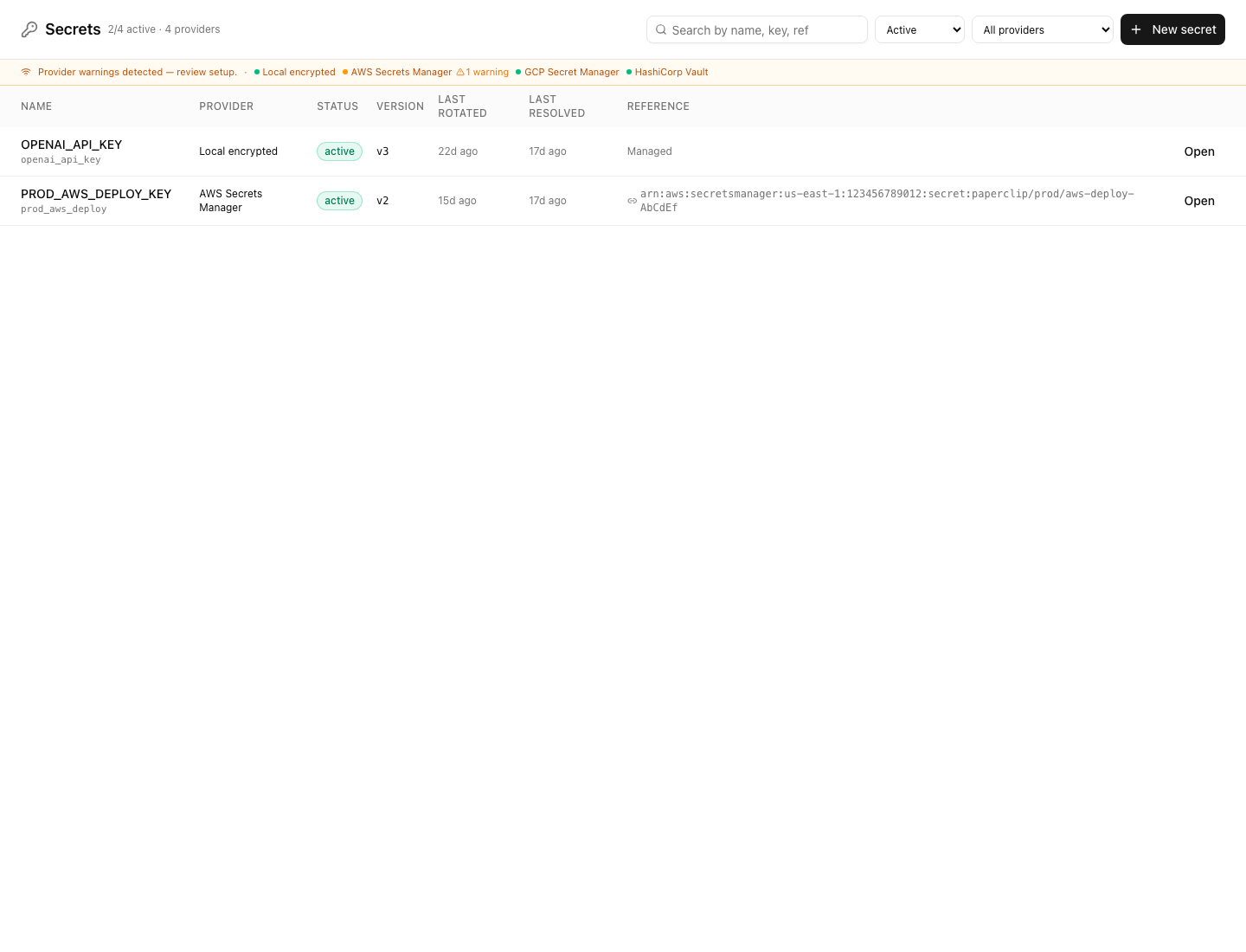 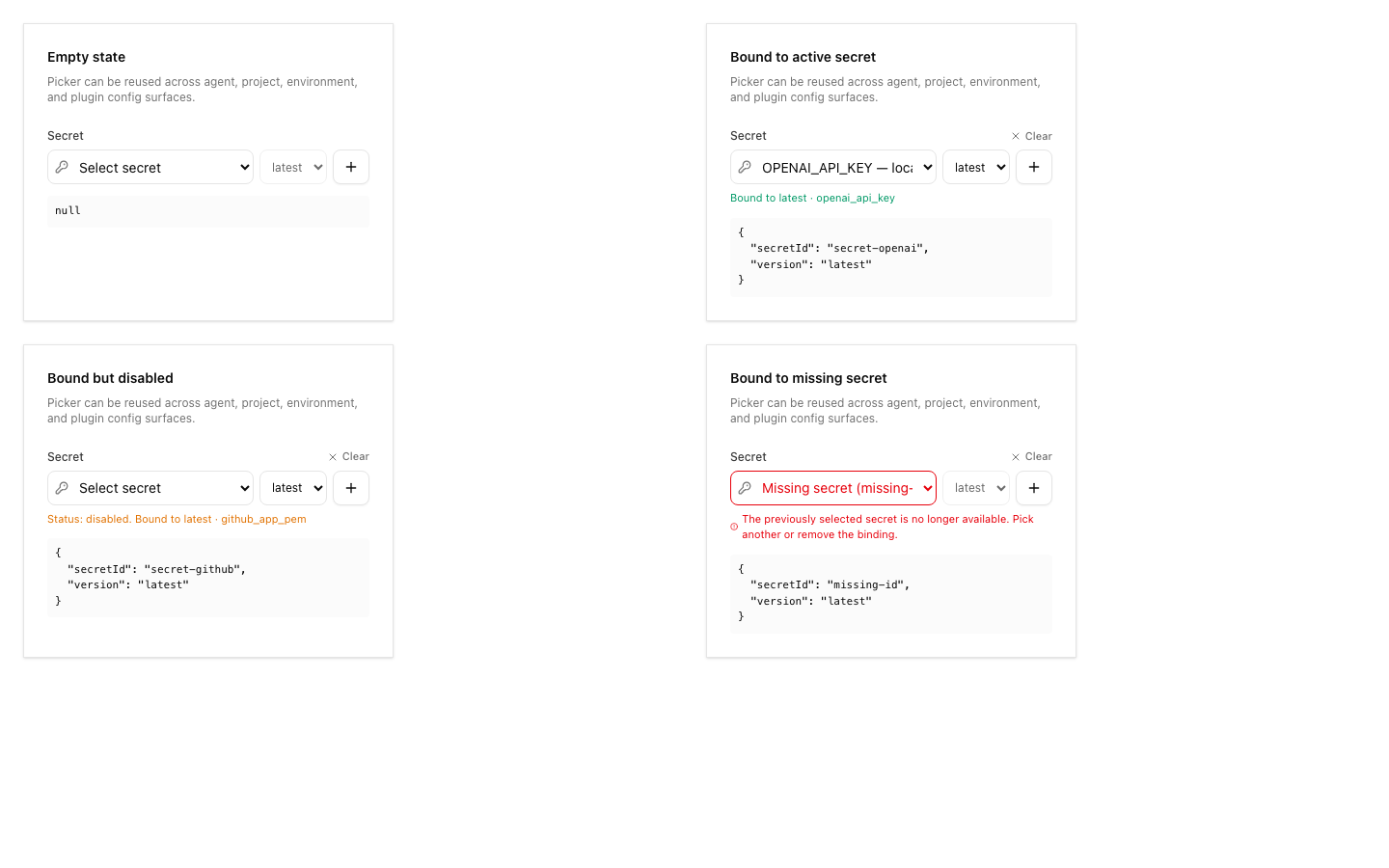 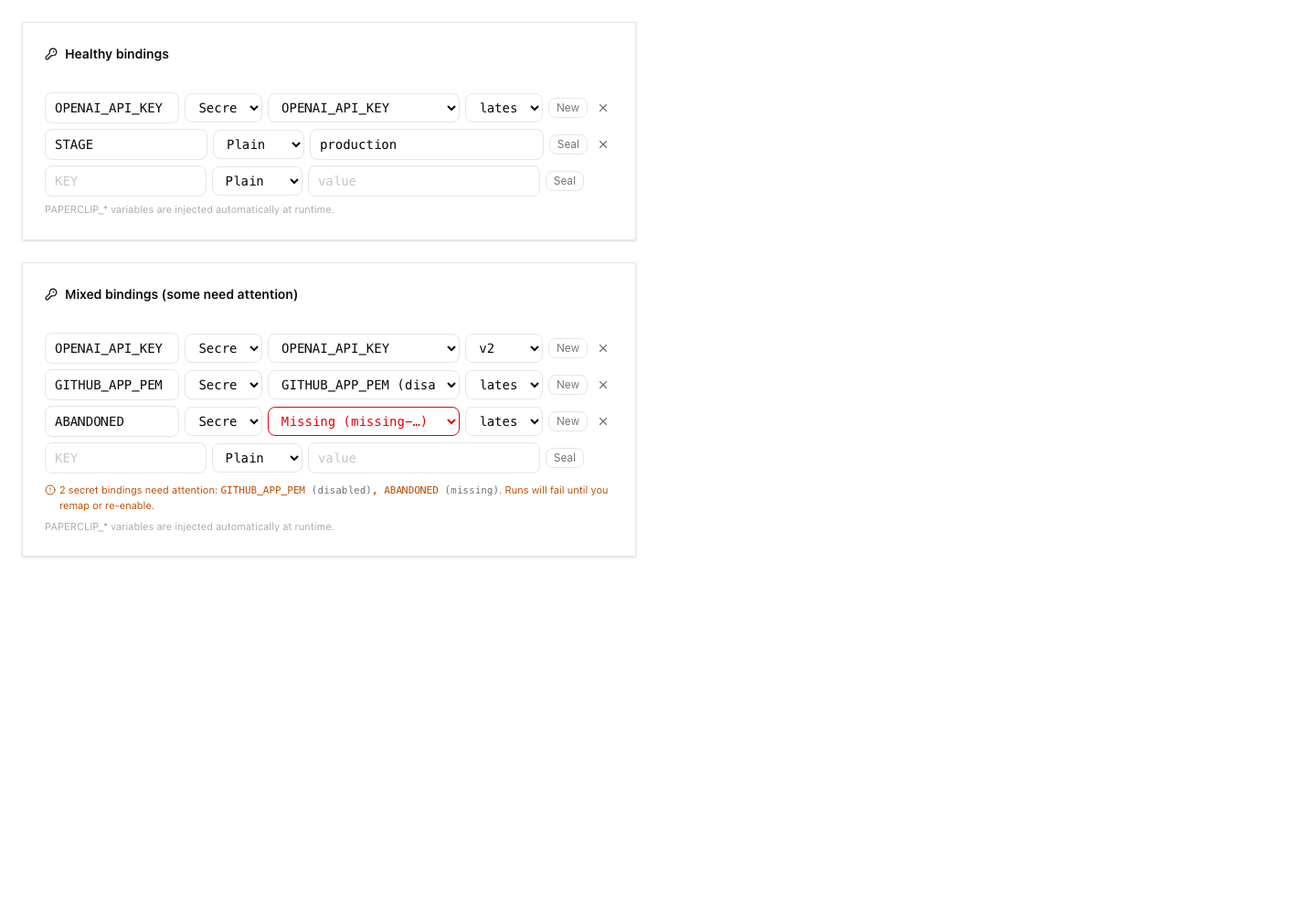 ## Risks - Migration risk: this adds new secret provider tables and extends existing secret rows. The migrations were checked for monotonic ordering and idempotent guards, but reviewers should still inspect upgrade behavior carefully. - Provider risk: AWS support uses direct SigV4 requests. Automated tests cover signing, request timeouts, vault-config selection, namespace guardrails, pending-version archival, sanitized provider errors, and service-level cleanup paths. A real-vault AWS smoke test remains deployment validation for an operator with AWS credentials rather than an unverified merge blocker in this local branch. - UI risk: the Secrets page and import dialog are large new surfaces; screenshots are included above for reviewer inspection. - Verification risk: the full local stable test command hit parallel-load timing failures, although the exact failed files passed when rerun directly. - Operational risk: remote import intentionally avoids plaintext reads; operators must understand that imported external references resolve at runtime and may fail if AWS permissions change. > For core feature work, check [`ROADMAP.md`](ROADMAP.md) first and discuss it in `#dev` before opening the PR. Feature PRs that overlap with planned core work may need to be redirected — check the roadmap first. See `CONTRIBUTING.md`. ## Model Used - OpenAI Codex, GPT-5 coding agent with local shell/tool use in the Paperclip worktree. Exact context-window size was not exposed by the runtime. ## Checklist - [x] I have included a thinking path that traces from project context to this change - [x] I have specified the model used (with version and capability details) - [x] I have checked ROADMAP.md and confirmed this PR does not duplicate planned core work - [ ] I have run tests locally and they pass - [x] I have added or updated tests where applicable - [x] If this change affects the UI, I have included before/after screenshots - [x] I have updated relevant documentation to reflect my changes - [x] I have considered and documented any risks above - [x] I will address all Greptile and reviewer comments before requesting merge --------- Co-authored-by: Paperclip <noreply@paperclip.ing> Co-authored-by: Claude Sonnet 4.6 <noreply@anthropic.com>



402 lines
18 KiB
Markdown
402 lines
18 KiB
Markdown
---
|
|
title: Secrets Management
|
|
summary: Master key, encryption, and strict mode
|
|
---
|
|
|
|
Paperclip encrypts secrets at rest using a local master key. Agent environment variables that contain sensitive values (API keys, tokens) are stored as encrypted secret references.
|
|
|
|
## Custody Boundaries
|
|
|
|
Paperclip protects secret values up to the moment they are handed to an agent
|
|
or workload:
|
|
|
|
- Storage: values are encrypted at rest by the active provider. The local
|
|
provider keeps them encrypted with a key that never leaves the host.
|
|
- Transport: values are decrypted server-side and injected into the agent
|
|
process environment, SSH command env, sandbox driver, or HTTP request
|
|
immediately before the call. Paperclip does not return decrypted values to
|
|
the board UI.
|
|
- Audit: each resolution records a non-sensitive event (secret id, version,
|
|
provider id, consumer, outcome) without the value or provider credentials.
|
|
|
|
Once a value reaches the consuming process, Paperclip can no longer guarantee
|
|
secrecy. The agent (or sandbox, or remote host) can read the value, write it to
|
|
its own logs or transcript, or pass it to downstream tools. Treat any secret
|
|
you bind to an agent as exposed to that agent. Limit blast radius with bindings
|
|
(only bind what each agent needs), short-lived provider credentials where the
|
|
provider supports them, and rotation when an agent transcript or downstream
|
|
system might have captured a value.
|
|
|
|
## Using Secrets In Runs
|
|
|
|
Creating a company secret does not automatically create an environment variable.
|
|
You use a secret by binding it into an agent, project, environment, or plugin
|
|
configuration field that supports secret references.
|
|
|
|
For agent and project environment variables:
|
|
|
|
1. Create or link the secret in `Company Settings > Secrets`.
|
|
2. Open the agent's `Environment variables` field, or the project's `Env`
|
|
field.
|
|
3. Add the environment variable key the process expects, such as `GH_TOKEN` or
|
|
`OPENAI_API_KEY`.
|
|
4. Set the row source to `Secret`, select the stored secret, and choose either
|
|
`latest` or a pinned version.
|
|
|
|
At runtime, Paperclip resolves the selected secret server-side and injects the
|
|
resolved value under the env key from the binding row. The stored secret name
|
|
can be human-readable; the binding key is what the agent process receives.
|
|
|
|
Project env applies to every issue run in that project. When a project env key
|
|
matches an agent env key, the project value wins before Paperclip injects its
|
|
own `PAPERCLIP_*` runtime variables.
|
|
|
|
## Default Provider: `local_encrypted`
|
|
|
|
Secrets are encrypted with a local master key stored at:
|
|
|
|
```
|
|
~/.paperclip/instances/default/secrets/master.key
|
|
```
|
|
|
|
This key is auto-created during onboarding. The key never leaves your machine.
|
|
Paperclip best-effort enforces `0600` permissions when it creates or loads the
|
|
key file. `paperclipai doctor` and the provider health API warn when the file is
|
|
readable by group or other users.
|
|
|
|
Back up the key file together with database backups. A database backup without
|
|
the key cannot decrypt local secrets, and a key backup without the database
|
|
metadata is not enough to restore named secret versions.
|
|
|
|
## Configuration
|
|
|
|
### CLI Setup
|
|
|
|
Onboarding writes default secrets config:
|
|
|
|
```sh
|
|
pnpm paperclipai onboard
|
|
```
|
|
|
|
Update secrets settings:
|
|
|
|
```sh
|
|
pnpm paperclipai configure --section secrets
|
|
```
|
|
|
|
Validate secrets config:
|
|
|
|
```sh
|
|
pnpm paperclipai doctor
|
|
pnpm paperclipai secrets doctor --company-id <company-id>
|
|
```
|
|
|
|
### Environment Overrides
|
|
|
|
| Variable | Description |
|
|
|----------|-------------|
|
|
| `PAPERCLIP_SECRETS_MASTER_KEY` | 32-byte key as base64, hex, or raw string |
|
|
| `PAPERCLIP_SECRETS_MASTER_KEY_FILE` | Custom key file path |
|
|
| `PAPERCLIP_SECRETS_STRICT_MODE` | Set to `true` to enforce secret refs |
|
|
|
|
## Strict Mode
|
|
|
|
When strict mode is enabled, sensitive env keys (matching `*_API_KEY`, `*_TOKEN`, `*_SECRET`) must use secret references instead of inline plain values.
|
|
|
|
```sh
|
|
PAPERCLIP_SECRETS_STRICT_MODE=true
|
|
```
|
|
|
|
Recommended for any deployment beyond local trusted.
|
|
|
|
Authenticated deployments default strict mode on unless explicitly overridden by
|
|
configuration or `PAPERCLIP_SECRETS_STRICT_MODE=false`.
|
|
|
|
## External References
|
|
|
|
Provider-owned secrets can be linked without copying values into Paperclip by
|
|
using `managedMode: "external_reference"` plus a provider `externalRef`.
|
|
Paperclip stores metadata and a non-sensitive fingerprint, never the value.
|
|
Runtime resolution remains server-side and binding-enforced.
|
|
|
|
The built-in AWS, GCP, and Vault provider IDs currently accept external
|
|
reference metadata, but runtime resolution requires provider configuration in the
|
|
deployment. Their provider health check reports this as a warning until
|
|
configured.
|
|
|
|
For hosted Paperclip Cloud on AWS, see the AWS Secrets Manager operational
|
|
contract — required env vars, IAM/KMS scoping, naming and tag conventions, and
|
|
backup/rotation/incident runbooks — in `doc/SECRETS-AWS-PROVIDER.md`.
|
|
|
|
## Provider Vaults
|
|
|
|
A *provider vault* is a named, company-scoped configuration that points secret
|
|
material at one of the supported provider backends. Each company can configure
|
|
multiple vaults, including more than one vault per provider family, and pick a
|
|
default vault per family for new secret operations. Existing secrets created
|
|
before any vault was configured continue to resolve through the deployment-level
|
|
default provider — no migration is required.
|
|
|
|
### Where to configure
|
|
|
|
Open `Company Settings → Secrets` in the board UI and switch to the
|
|
`Provider vaults` tab. From there you can:
|
|
|
|
- Create a vault for any supported provider family.
|
|
- Edit the non-secret config of an existing vault.
|
|
- Set one ready vault per provider family as the company default.
|
|
- Disable a vault (a soft delete that keeps audit history).
|
|
- Run a health check against a vault and read the latest result inline.
|
|
|
|
The same operations are exposed under
|
|
`/api/companies/{companyId}/secret-provider-configs` for automation. See the
|
|
[secrets API reference](/api/secrets#provider-vaults) for the full route table.
|
|
|
|
### Custody Of Provider Credentials
|
|
|
|
Provider vaults intentionally store only **non-sensitive** configuration:
|
|
region, project id, namespace, prefix, KMS key id, mount path, address, and
|
|
similar routing metadata. The API, UI, and activity log never accept, return,
|
|
or display provider credential values. Submitting fields with names like
|
|
`accessKeyId`, `secretAccessKey`, `token`, `password`, `serviceAccountJson`,
|
|
`privateKey`, `keyFile`, `unsealKey`, or any common credential alias is rejected
|
|
at validation time.
|
|
|
|
That keeps the bootstrap rule from the AWS provider applicable to every
|
|
provider family: **provider credentials live in deployment infrastructure
|
|
identity, not in Paperclip company secrets**. Allowed credential sources are
|
|
workload identity attached to the Paperclip server (instance profile, IRSA, ECS
|
|
task role), `AWS_PROFILE` / SSO / shared config for local runs, an orchestrator
|
|
secret store that boots the server, or short-lived shell credentials for local
|
|
development. Do not paste long-lived API keys into the vault config.
|
|
|
|
### Vault Status
|
|
|
|
Each vault carries a status that drives what the runtime can do with it:
|
|
|
|
| Status | Meaning |
|
|
|---------------|-----------------------------------------------------------------------------------------------|
|
|
| `ready` | Selectable for create/rotate/resolve. Eligible to be the default. |
|
|
| `warning` | Saved config exists but health needs attention (for example missing AWS env). Still selectable. |
|
|
| `coming_soon` | Visible and editable as draft metadata, but locked out of all runtime operations. |
|
|
| `disabled` | Soft-deleted. Hidden from the secret create/rotate flow. |
|
|
|
|
`gcp_secret_manager` and `vault` are pinned to `coming_soon` until their
|
|
runtime modules ship. The settings UI lets you save draft configuration for
|
|
those providers (and surfaces them on the vault list), but secret create,
|
|
rotate, and resolve calls that target a coming-soon vault fail with a clear
|
|
runtime-locked error.
|
|
|
|
### Default Vault Behavior
|
|
|
|
A company can mark **one** ready (or warning) vault per provider family as the
|
|
default. The secret create and rotate dialogs preselect the default vault for
|
|
the chosen provider so operators don't have to remember which vault to pick.
|
|
Coming-soon and disabled vaults cannot be marked default; attempting to do so
|
|
returns a validation error. Setting a new default automatically clears the
|
|
previous default for that provider.
|
|
|
|
If a secret is created without any `providerConfigId` (no vaults exist yet, or
|
|
the operator clears the selector), runtime resolution falls back to the
|
|
deployment-level provider configuration — the same path existing installs use.
|
|
This keeps secrets created before any provider vault was configured working
|
|
without migration. Picking the default in the UI is an explicit selection, not
|
|
a runtime fallback: the create call still sends an explicit `providerConfigId`.
|
|
|
|
### Multiple Vaults Per Provider
|
|
|
|
Multiple vaults from the same provider family are first-class. Common patterns:
|
|
|
|
- Two AWS vaults pointing at different regions or KMS keys for environment
|
|
separation.
|
|
- A staging Vault address alongside a production address.
|
|
- A dedicated GCP project for a single product line while the rest of the
|
|
company uses another.
|
|
|
|
Each vault has its own display name, status, default flag, and health record.
|
|
Operators choose the vault explicitly when creating or rotating a secret; the
|
|
default vault is preselected to avoid accidental routing to the wrong account.
|
|
|
|
### Per-Vault Health Checks
|
|
|
|
`POST /api/secret-provider-configs/{id}/health` runs a provider-specific health
|
|
probe and stores the result on the vault row. The settings UI exposes the same
|
|
action and renders the result inline. Health responses include a status,
|
|
operator-facing message, and structured guidance (such as missing env var
|
|
names, expected credential sources, and backup reminders). They never include
|
|
provider credentials or secret values. Coming-soon vaults always return a
|
|
`runtime_locked` health code and never call into provider modules.
|
|
|
|
### Provider-Specific Notes
|
|
|
|
**Local encrypted vaults** wrap the existing `local_encrypted` provider. The
|
|
master key path and rotation guidance described above still applies. A local
|
|
vault config is mostly bookkeeping plus an explicit acknowledgement that the
|
|
key file is backed up alongside the database.
|
|
|
|
**AWS Secrets Manager vaults** read the per-vault `region`, `namespace`,
|
|
`secretNamePrefix`, `kmsKeyId`, `ownerTag`, and `environmentTag` to route
|
|
managed writes and external-reference reads. The vault config supplements (and
|
|
can override) the deployment-level `PAPERCLIP_SECRETS_AWS_*` env. Bootstrap
|
|
credentials still come from the AWS SDK default credential chain — see
|
|
`doc/SECRETS-AWS-PROVIDER.md` for the full IAM and KMS contract.
|
|
|
|
**GCP Secret Manager** and **HashiCorp Vault** vaults are coming soon. You can
|
|
save draft `projectId`, `location`, `namespace`, `address`, and `mountPath`
|
|
metadata so the company is ready to flip them on when the provider modules
|
|
ship. Vault `address` values must be origin-only `http(s)://host[:port]` URLs;
|
|
addresses with embedded credentials, paths, query strings, or fragments are
|
|
rejected.
|
|
|
|
### Remote Import From AWS Vaults
|
|
|
|
AWS provider vaults can import existing AWS Secrets Manager entries as
|
|
Paperclip `external_reference` secrets. This is a metadata-only link: Paperclip
|
|
stores the AWS ARN/path, a fingerprint/version reference, and binding metadata.
|
|
It does not read, copy, store, log, or display the remote plaintext secret
|
|
value during preview or import.
|
|
|
|
Operator flow in the board UI:
|
|
|
|
1. Open `Company Settings -> Secrets`.
|
|
2. Confirm at least one AWS provider vault is `ready` or `warning`.
|
|
3. In the `Secrets` tab, choose `Import from vault`.
|
|
4. Select an AWS vault, search the remote inventory, and load more pages as
|
|
needed.
|
|
5. Check the rows to import, review/edit the Paperclip name and key, then
|
|
submit.
|
|
6. Review the result summary for created, skipped, and failed rows.
|
|
|
|
The preview list is intentionally paged and search-first. AWS accounts can have
|
|
large per-Region inventories, and `ListSecrets` returns opaque `NextToken`
|
|
cursors. Do not expect Paperclip to crawl a whole account in the background;
|
|
load pages deliberately and retry throttled requests with backoff.
|
|
|
|
Remote import exposes AWS secret metadata visible to the Paperclip runtime
|
|
role, including names/ARNs and safe derived fields such as dates, whether a
|
|
description or KMS key exists, and tag count. Treat names, ARNs, tags, and
|
|
search text as operational metadata that may be sensitive. The API and activity
|
|
log must not store raw descriptions, tags, plaintext values, provider
|
|
credentials, or raw AWS error blobs.
|
|
|
|
Required AWS posture:
|
|
|
|
- Preview needs optional `secretsmanager:ListSecrets` permission on
|
|
`Resource: "*"`. AWS does not support constraining `ListSecrets` to
|
|
individual secret ARNs or tags as an IAM boundary.
|
|
- Preview/import must not call `secretsmanager:GetSecretValue`,
|
|
`secretsmanager:BatchGetSecretValue`, or KMS decrypt.
|
|
- Runtime resolution of an imported reference still needs
|
|
`secretsmanager:GetSecretValue` on the selected external ARN/path and KMS
|
|
decrypt when that secret uses a customer-managed key.
|
|
- Keep managed create/rotate/delete permissions scoped to the Paperclip
|
|
deployment prefix. Do not broaden managed write/delete permissions just
|
|
because import inventory is enabled.
|
|
|
|
Safe scoping comes from deployment posture rather than AWS list filtering:
|
|
dedicated Paperclip runtime roles per environment/account, AWS vaults pointed at
|
|
the intended account and Region, import-enabled roles only where inventory
|
|
exposure is acceptable, and board-only access to the import routes. Tags and
|
|
name filters are search aids, not a permission model.
|
|
|
|
If import preview fails:
|
|
|
|
- `AccessDenied` or `not authorized`: the runtime role is missing
|
|
`secretsmanager:ListSecrets`; add the optional inventory statement only if
|
|
remote import should be enabled for that vault.
|
|
- Throttling: retry after a short delay and narrow the search before loading
|
|
more pages.
|
|
- Invalid cursor: refresh the preview; AWS `NextToken` values are opaque and
|
|
can expire or become stale.
|
|
- Runtime resolution failure after import: verify `GetSecretValue` and KMS
|
|
decrypt scope for the selected external secret. Being visible in inventory is
|
|
not proof that the runtime role can read the value.
|
|
|
|
### Backup And Restore
|
|
|
|
Each provider family has a different backup story:
|
|
|
|
- `local_encrypted`: back up the local master key file and the Paperclip
|
|
database together. Either alone is not enough to restore the encrypted
|
|
values, and the vault row only records the path and acknowledgement, not the
|
|
key bytes.
|
|
- `aws_secrets_manager`: back up Paperclip's database for vault metadata
|
|
(vault id, region, prefix, KMS key id, default flag, bindings, version
|
|
pointers). The actual secret values live in AWS Secrets Manager under the
|
|
configured prefix; restore by pointing the same Paperclip company at the
|
|
same AWS namespace and confirming the runtime role still has
|
|
`GetSecretValue` plus KMS decrypt. The full restore checklist lives in
|
|
`doc/SECRETS-AWS-PROVIDER.md`.
|
|
- `gcp_secret_manager` and `vault`: while these are coming soon, only the
|
|
draft vault config exists in Paperclip. Database backups capture it. There
|
|
is nothing to restore on the provider side until runtime support lands.
|
|
|
|
### AWS Provider Bootstrap Boundary
|
|
|
|
The AWS Secrets Manager provider cannot bootstrap itself from Paperclip
|
|
`company_secrets`. Its initial AWS access must be present before the server can
|
|
create or resolve AWS-backed company secrets, regardless of whether you use the
|
|
deployment-level default or a per-company vault.
|
|
|
|
For Paperclip Cloud, provision the server runtime IAM role/workload identity,
|
|
KMS key, deployment prefix, and non-secret `PAPERCLIP_SECRETS_AWS_*` environment
|
|
configuration before enabling AWS-backed secrets in the board UI. For
|
|
self-hosted and local runs, use the AWS SDK default credential chain: instance
|
|
profile, ECS task role, EKS IRSA/OIDC web identity, AWS SSO/shared config via
|
|
`AWS_PROFILE`, or short-lived shell credentials for local development.
|
|
|
|
Do not store AWS root credentials or long-lived IAM user access keys in
|
|
Paperclip secrets. Bootstrap material belongs in infrastructure IAM/workload
|
|
identity, the process environment, an AWS profile, or the orchestrator secret
|
|
store.
|
|
|
|
## Migrating Inline Secrets
|
|
|
|
If you have existing agents with inline API keys in their config, migrate them to encrypted secret refs:
|
|
|
|
```sh
|
|
pnpm paperclipai secrets migrate-inline-env --company-id <company-id>
|
|
pnpm paperclipai secrets migrate-inline-env --company-id <company-id> --apply
|
|
|
|
# low-level script for direct database maintenance
|
|
pnpm secrets:migrate-inline-env # dry run
|
|
pnpm secrets:migrate-inline-env --apply # apply migration
|
|
```
|
|
|
|
Use the CLI command for normal operations because it goes through the Paperclip
|
|
API, creates or rotates secret records, and updates agent env bindings with
|
|
audit logging.
|
|
|
|
## Portable Declarations
|
|
|
|
Company exports include only environment declarations. They do not include
|
|
secret IDs, provider references, encrypted material, or plaintext values.
|
|
|
|
```sh
|
|
pnpm paperclipai secrets declarations --company-id <company-id> --kind secret
|
|
```
|
|
|
|
Before importing a package into another instance, use those declarations to
|
|
create local values or link hosted provider references in the target deployment.
|
|
For hosted providers such as AWS Secrets Manager, the hosted provider remains
|
|
the value custodian; Paperclip stores metadata and provider version references,
|
|
not provider credentials or plaintext secret values.
|
|
|
|
## Secret References in Agent Config
|
|
|
|
Agent environment variables use secret references:
|
|
|
|
```json
|
|
{
|
|
"env": {
|
|
"ANTHROPIC_API_KEY": {
|
|
"type": "secret_ref",
|
|
"secretId": "8f884973-c29b-44e4-8ea3-6413437f8081",
|
|
"version": "latest"
|
|
}
|
|
}
|
|
}
|
|
```
|
|
|
|
The server resolves and decrypts these at runtime, injecting the real value into the agent process environment.
|