forked from farhoodlabs/paperclip
 Dotta
778e775c35
Dotta
778e775c35
## Thinking Path > - Paperclip orchestrates AI-agent companies and needs secrets handling to work across local development, hosted operators, and governed agent execution. > - The affected subsystem is the company-scoped secrets control plane: database schema, server services/routes, CLI workflows, and the Secrets settings UI. > - The gap was that secrets were local-only and operators could not manage provider vaults or import existing remote references without exposing plaintext. > - This branch adds provider vault configuration plus an AWS Secrets Manager remote-import path while preserving company boundaries, binding context, and audit trails. > - I kept the PR to a single branch PR, removed unrelated lockfile/package drift, rebased the full branch onto the current `public-gh/master`, and addressed fresh Greptile findings. > - The benefit is a reviewable implementation of provider-backed secrets with focused tests covering provider selection, import conflicts, deleted secret reuse, rotation guards, and AWS signing behavior. ## What Changed - Added provider vault support for company secrets, including provider config storage, default vault handling, health checks, binding usage, access events, and remote import preview/commit. - Added an AWS Secrets Manager provider using SigV4 request signing, bounded request timeouts, namespace guardrails, cached runtime credential resolution, and external-reference linking without plaintext reads. - Added Secrets UI surfaces for vault management and remote import, plus CLI/API documentation for setup and operations. - Stabilized routine webhook secret binding paths and SSH environment-driver fixture bindings discovered during verification. - Addressed Greptile and CI findings: no lockfile/package drift, monotonic migration metadata, disabled-vault default races, soft-deleted secret hiding/recreate behavior, remove behavior with disabled vaults, soft-deleted external-reference re-import, non-active rotation guards, managed-secret soft deletion through PATCH, and per-call AWS SDK credential client churn. - Rebased this branch onto `public-gh/master` at `0e1a5828` and force-pushed with lease to keep this as the single PR for the branch. ## Verification - `git fetch public-gh master` - `git rebase public-gh/master` - `git diff --name-only public-gh/master...HEAD | grep '^pnpm-lock\.yaml$' || true` confirmed `pnpm-lock.yaml` is not in the PR diff. - Confirmed migration ordering: master ends at `0081_optimal_dormammu`; this PR adds `0082_dry_vision` and `0083_company_secret_provider_configs`. - Inspected migrations for repeat safety: new tables/indexes use `IF NOT EXISTS`; foreign keys are guarded by `DO $$ ... IF NOT EXISTS`; column additions use `ADD COLUMN IF NOT EXISTS`. - `pnpm -r typecheck` passed before the Greptile follow-up commits. - `pnpm test:run` ran the full stable Vitest path before the Greptile follow-up commits; it completed with 3 timing-related failures under parallel load: `codex-local-execute.test.ts`, `cursor-local-execute.test.ts`, and `environment-service.test.ts`. - `pnpm --filter @paperclipai/server exec vitest run src/__tests__/codex-local-execute.test.ts src/__tests__/cursor-local-execute.test.ts src/__tests__/environment-service.test.ts` passed on targeted rerun (`24/24`). - `pnpm build` passed before the Greptile follow-up commits. Vite reported existing chunk-size/dynamic-import warnings. - After Greptile follow-up commits: `pnpm --filter @paperclipai/server exec vitest run src/__tests__/secrets-service.test.ts` passed (`26/26`). - After Greptile follow-up commits: `pnpm --filter @paperclipai/server exec vitest run src/__tests__/aws-secrets-manager-provider.test.ts src/__tests__/secrets-service.test.ts` passed (`39/39`). - After Greptile follow-up commits: `pnpm --filter @paperclipai/server typecheck` passed. - Captured Storybook screenshots from `ui/storybook-static` for visual review. - Latest PR checks on `5ca3a5cf`: `policy`, serialized server suites 1/4-4/4, `Canary Dry Run`, `e2e`, `security/snyk`, and `Greptile Review` pass; aggregate `verify` is still registering the completed child checks. - Greptile review loop continued through the latest requested pass; all Greptile review threads are resolved and the latest `Greptile Review` check on `5ca3a5cf` passed with 0 comments added. ## Screenshots Before: the provider-vault and remote-import surfaces did not exist on `master`; these are after-state screenshots from the Storybook fixtures. 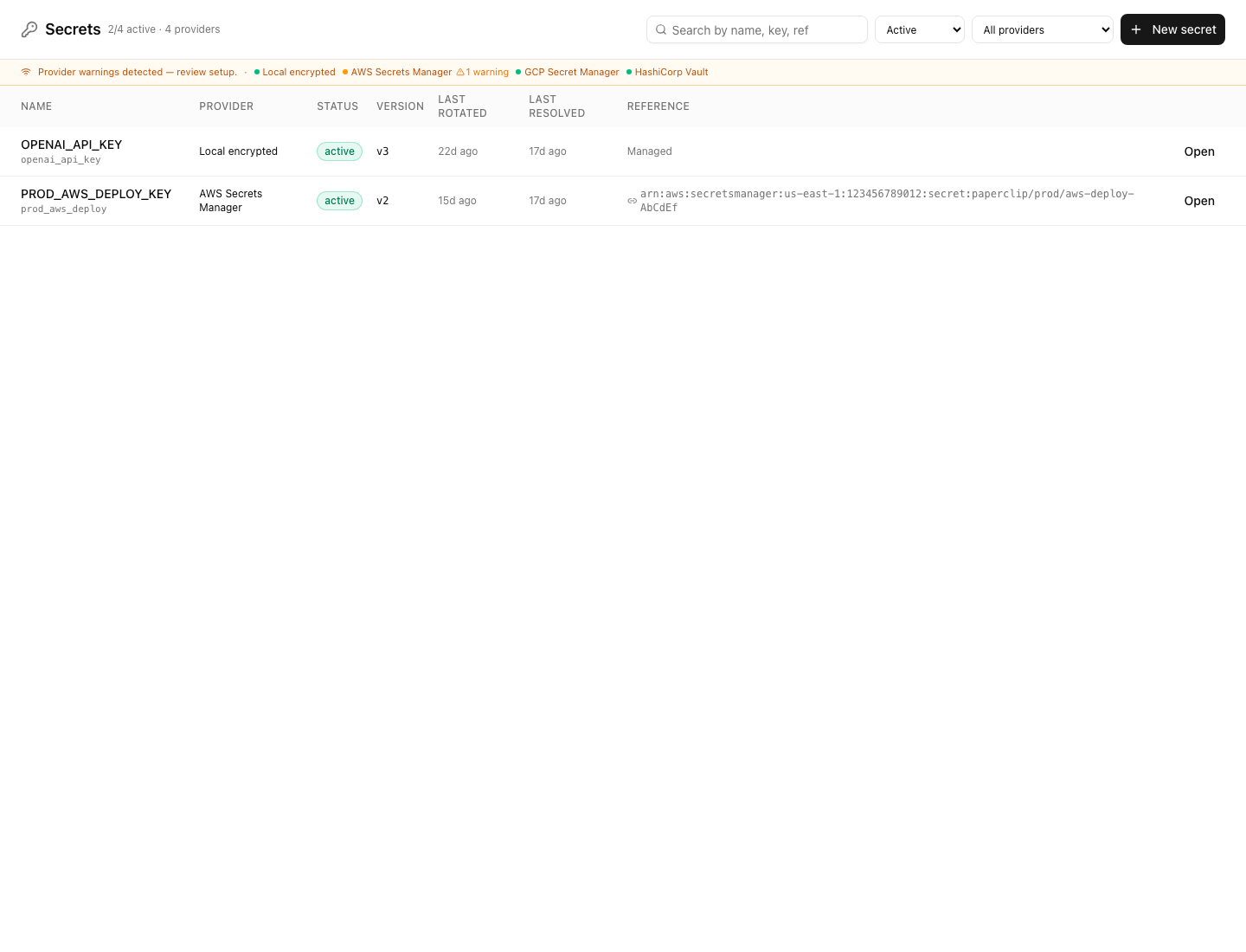 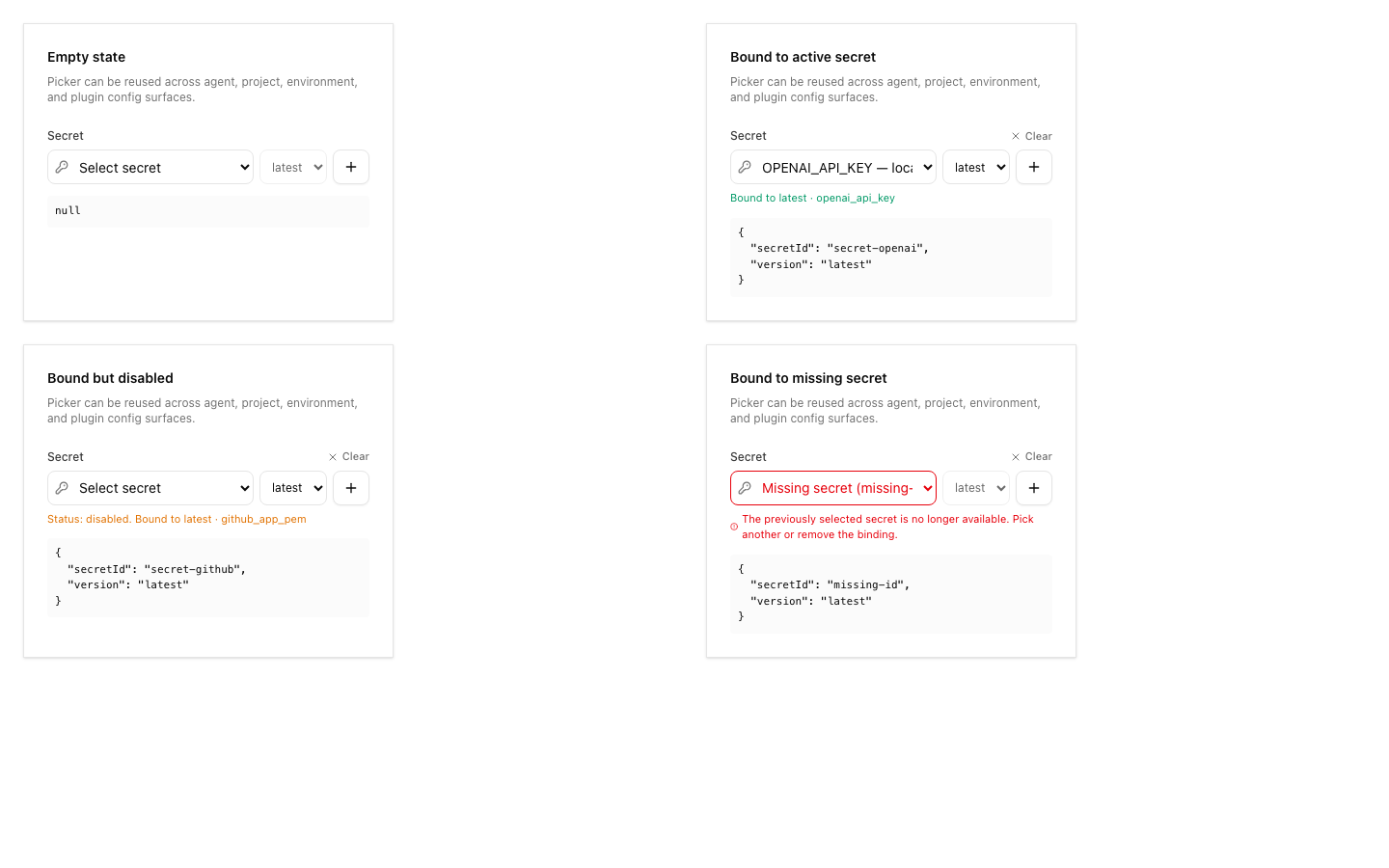 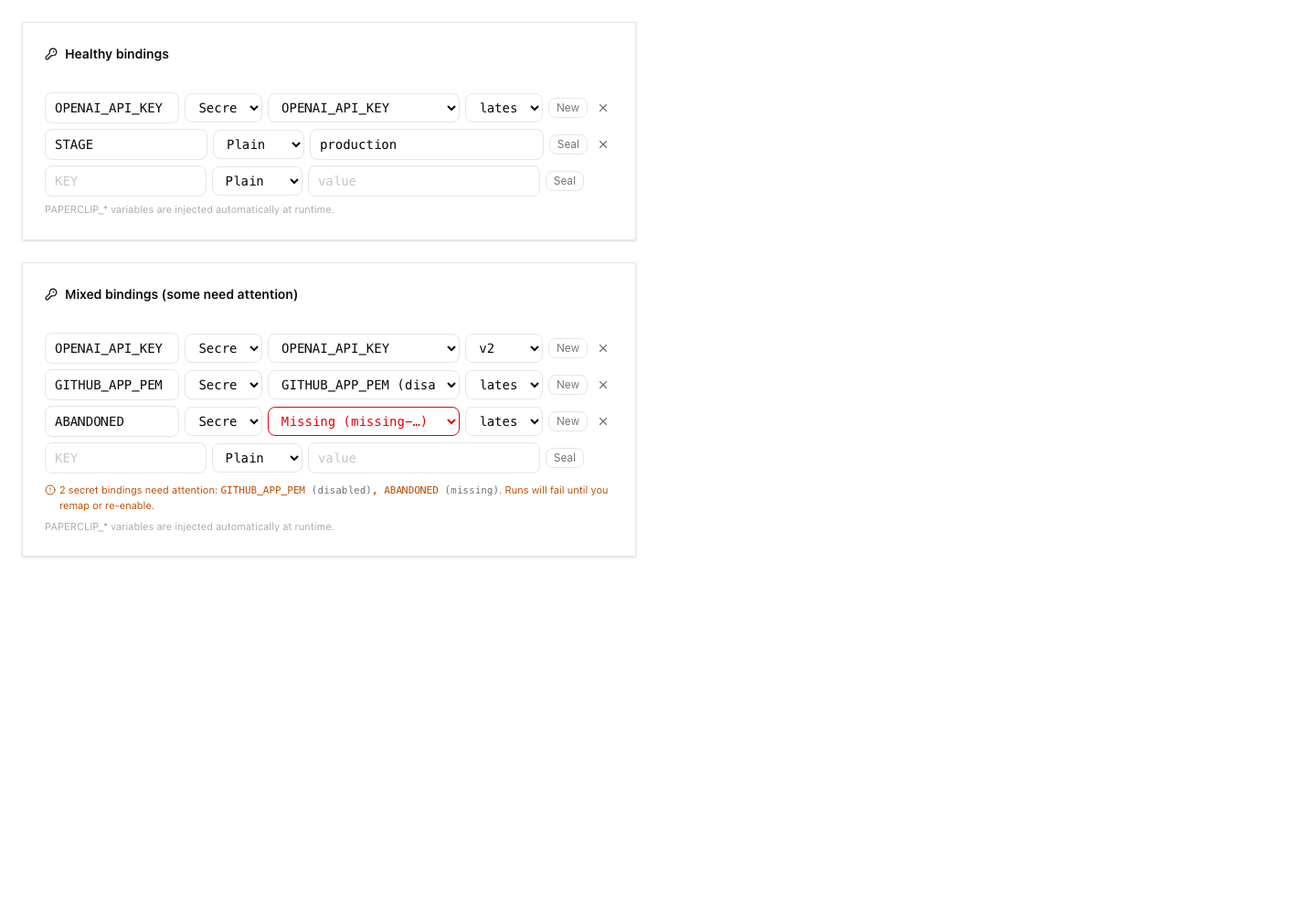 ## Risks - Migration risk: this adds new secret provider tables and extends existing secret rows. The migrations were checked for monotonic ordering and idempotent guards, but reviewers should still inspect upgrade behavior carefully. - Provider risk: AWS support uses direct SigV4 requests. Automated tests cover signing, request timeouts, vault-config selection, namespace guardrails, pending-version archival, sanitized provider errors, and service-level cleanup paths. A real-vault AWS smoke test remains deployment validation for an operator with AWS credentials rather than an unverified merge blocker in this local branch. - UI risk: the Secrets page and import dialog are large new surfaces; screenshots are included above for reviewer inspection. - Verification risk: the full local stable test command hit parallel-load timing failures, although the exact failed files passed when rerun directly. - Operational risk: remote import intentionally avoids plaintext reads; operators must understand that imported external references resolve at runtime and may fail if AWS permissions change. > For core feature work, check [`ROADMAP.md`](ROADMAP.md) first and discuss it in `#dev` before opening the PR. Feature PRs that overlap with planned core work may need to be redirected — check the roadmap first. See `CONTRIBUTING.md`. ## Model Used - OpenAI Codex, GPT-5 coding agent with local shell/tool use in the Paperclip worktree. Exact context-window size was not exposed by the runtime. ## Checklist - [x] I have included a thinking path that traces from project context to this change - [x] I have specified the model used (with version and capability details) - [x] I have checked ROADMAP.md and confirmed this PR does not duplicate planned core work - [ ] I have run tests locally and they pass - [x] I have added or updated tests where applicable - [x] If this change affects the UI, I have included before/after screenshots - [x] I have updated relevant documentation to reflect my changes - [x] I have considered and documented any risks above - [x] I will address all Greptile and reviewer comments before requesting merge --------- Co-authored-by: Paperclip <noreply@paperclip.ing> Co-authored-by: Claude Sonnet 4.6 <noreply@anthropic.com>



369 lines
14 KiB
Markdown
369 lines
14 KiB
Markdown
# AWS Secrets Manager Provider
|
|
|
|
Operational contract for the hosted `aws_secrets_manager` secret provider used by Paperclip Cloud.
|
|
|
|
## Scope
|
|
|
|
- Hosted provider for Paperclip-managed secrets when Paperclip Cloud runs on AWS.
|
|
- Source of truth for secret values is AWS Secrets Manager, not Postgres.
|
|
- Paperclip stores only metadata needed for ownership, bindings, version selection, audit, and runtime resolution.
|
|
- AWS provider bootstrap credentials are deployment/runtime credentials, not Paperclip-managed company secrets.
|
|
- Remote import for existing AWS secrets is metadata-only. Preview/import uses
|
|
AWS inventory metadata and creates Paperclip external references; it does not
|
|
copy plaintext into Paperclip.
|
|
- Per-company AWS provider vaults (named instances of `aws_secrets_manager`
|
|
with their own region, namespace, prefix, KMS key id, and tags) are managed
|
|
in the board UI under `Company Settings → Secrets → Provider vaults`. See
|
|
[Provider Vaults](../docs/deploy/secrets.md#provider-vaults) for the operator
|
|
model and [Provider Vaults API](../docs/api/secrets.md#provider-vaults) for
|
|
the routes. The bootstrap trust model in this document still applies — vault
|
|
config carries non-sensitive routing metadata only, never AWS credentials.
|
|
|
|
## Bootstrap Trust Model
|
|
|
|
The AWS provider has a chicken-and-egg boundary: Paperclip cannot use
|
|
`company_secrets` to unlock the AWS provider that stores those secrets. The
|
|
initial AWS trust must exist before the Paperclip server starts.
|
|
|
|
Allowed bootstrap locations:
|
|
|
|
- Infrastructure IAM or workload identity attached to the Paperclip server
|
|
runtime.
|
|
- Process environment or orchestrator secret store used to start the Paperclip
|
|
server.
|
|
- Local AWS SDK sources such as `AWS_PROFILE`, AWS SSO/shared config, web
|
|
identity, container metadata, or instance metadata.
|
|
- Short-lived shell credentials for local development only.
|
|
|
|
Do not ask operators to paste AWS root credentials or long-lived IAM user access
|
|
keys into the Paperclip board UI. Do not store those bootstrap keys in
|
|
`company_secrets`.
|
|
|
|
## Paperclip Cloud Bootstrap
|
|
|
|
Paperclip Cloud must provision the AWS backing resources before any board user
|
|
can create AWS-backed company secrets:
|
|
|
|
1. Create or select the deployment KMS key.
|
|
2. Create the Paperclip server runtime role for the deployment.
|
|
3. Attach a minimum IAM policy scoped to the deployment Secrets Manager prefix
|
|
and the configured KMS key.
|
|
4. Configure the server runtime with the non-secret provider environment
|
|
variables below.
|
|
5. Run `paperclipai doctor` or the provider health endpoint from the deployed
|
|
runtime and confirm that the provider reports the expected region, prefix,
|
|
deployment id, KMS setting, and AWS SDK credential source.
|
|
|
|
Once this is in place, the board UI can create Paperclip-managed AWS secrets and
|
|
Paperclip will write them under the deployment/company namespace.
|
|
|
|
## Self-Hosted And Local Bootstrap
|
|
|
|
Self-hosted AWS deployments should use the AWS SDK default credential provider
|
|
chain. Preferred sources are role-based:
|
|
|
|
- EC2 instance profile.
|
|
- ECS task role.
|
|
- EKS IRSA or another OIDC web identity role.
|
|
- AWS SSO/shared config via `AWS_PROFILE`.
|
|
|
|
Local development can use:
|
|
|
|
```sh
|
|
aws sso login --profile paperclip-dev
|
|
AWS_PROFILE=paperclip-dev \
|
|
PAPERCLIP_SECRETS_PROVIDER=aws_secrets_manager \
|
|
PAPERCLIP_SECRETS_AWS_REGION=us-east-1 \
|
|
PAPERCLIP_SECRETS_AWS_DEPLOYMENT_ID=dev-local \
|
|
PAPERCLIP_SECRETS_AWS_KMS_KEY_ID=arn:aws:kms:us-east-1:123456789012:key/abcd-... \
|
|
pnpm dev
|
|
```
|
|
|
|
Temporary `AWS_ACCESS_KEY_ID`/`AWS_SECRET_ACCESS_KEY` environment credentials
|
|
are acceptable only as a local break-glass or short-lived test source. They
|
|
should not be written to Paperclip config, committed to `.env` files, stored in
|
|
`company_secrets`, or used as the default Paperclip Cloud bootstrap path.
|
|
|
|
## Deployment Config
|
|
|
|
Required environment variables:
|
|
|
|
```sh
|
|
PAPERCLIP_SECRETS_PROVIDER=aws_secrets_manager
|
|
PAPERCLIP_SECRETS_AWS_REGION=us-east-1
|
|
PAPERCLIP_SECRETS_AWS_DEPLOYMENT_ID=prod-us-1
|
|
PAPERCLIP_SECRETS_AWS_KMS_KEY_ID=arn:aws:kms:us-east-1:123456789012:key/abcd-...
|
|
```
|
|
|
|
Optional environment variables:
|
|
|
|
```sh
|
|
PAPERCLIP_SECRETS_AWS_PREFIX=paperclip
|
|
PAPERCLIP_SECRETS_AWS_ENVIRONMENT=production
|
|
PAPERCLIP_SECRETS_AWS_PROVIDER_OWNER=paperclip
|
|
PAPERCLIP_SECRETS_AWS_ENDPOINT=
|
|
PAPERCLIP_SECRETS_AWS_DELETE_RECOVERY_DAYS=30
|
|
```
|
|
|
|
Naming convention for Paperclip-managed secrets:
|
|
|
|
```text
|
|
paperclip/{deploymentId}/{companyId}/{secretKey}
|
|
```
|
|
|
|
Tag set for Paperclip-managed secrets:
|
|
|
|
- `paperclip:managed-by=paperclip`
|
|
- `paperclip:provider-owner=<owner tag>`
|
|
- `paperclip:deployment-id=<deployment id>`
|
|
- `paperclip:company-id=<company id>`
|
|
- `paperclip:secret-key=<secret key>`
|
|
- `paperclip:environment=<environment tag>`
|
|
|
|
## IAM And KMS Assumptions
|
|
|
|
Launch posture:
|
|
|
|
- One Paperclip app role per deployment.
|
|
- One deployment-scoped KMS key per deployment at launch.
|
|
- Future per-company KMS keys remain compatible because Paperclip stores provider refs and version metadata separately from values.
|
|
|
|
Minimum IAM boundary:
|
|
|
|
- Allow `secretsmanager:CreateSecret`, `PutSecretValue`, `GetSecretValue`, and `DeleteSecret`.
|
|
- Scope resources to the deployment prefix:
|
|
|
|
```text
|
|
arn:aws:secretsmanager:<region>:<account-id>:secret:paperclip/<deployment-id>/*
|
|
```
|
|
|
|
- Allow `kms:Encrypt`, `kms:Decrypt`, `kms:GenerateDataKey`, and `kms:DescribeKey` for the configured deployment CMK.
|
|
- Deny wildcard access outside the deployment prefix.
|
|
- Prefer workload identity / role-based auth. Do not store AWS credentials inline in Paperclip config.
|
|
|
|
Example minimum policy shape:
|
|
|
|
```json
|
|
{
|
|
"Version": "2012-10-17",
|
|
"Statement": [
|
|
{
|
|
"Sid": "PaperclipDeploymentSecrets",
|
|
"Effect": "Allow",
|
|
"Action": [
|
|
"secretsmanager:CreateSecret",
|
|
"secretsmanager:PutSecretValue",
|
|
"secretsmanager:GetSecretValue",
|
|
"secretsmanager:DeleteSecret"
|
|
],
|
|
"Resource": "arn:aws:secretsmanager:<region>:<account-id>:secret:paperclip/<deployment-id>/*"
|
|
},
|
|
{
|
|
"Sid": "PaperclipDeploymentKms",
|
|
"Effect": "Allow",
|
|
"Action": [
|
|
"kms:Encrypt",
|
|
"kms:Decrypt",
|
|
"kms:GenerateDataKey",
|
|
"kms:DescribeKey"
|
|
],
|
|
"Resource": "arn:aws:kms:<region>:<account-id>:key/<key-id>"
|
|
}
|
|
]
|
|
}
|
|
```
|
|
|
|
Operational expectation:
|
|
|
|
- Paperclip-managed secrets may be deleted only by Paperclip or an operator with equivalent break-glass access.
|
|
- External references may resolve through Paperclip runtime, but Paperclip should not delete the external secret resource.
|
|
|
|
## Remote Import Inventory IAM
|
|
|
|
Remote import preview needs one additional AWS permission:
|
|
|
|
```json
|
|
{
|
|
"Sid": "PaperclipRemoteSecretInventory",
|
|
"Effect": "Allow",
|
|
"Action": "secretsmanager:ListSecrets",
|
|
"Resource": "*"
|
|
}
|
|
```
|
|
|
|
This is intentionally separate from the managed create/rotate/delete policy.
|
|
AWS treats `ListSecrets` as an account/Region inventory action; do not document
|
|
secret ARNs, names, tags, or AWS request filters as an IAM boundary for it. Use
|
|
`Resource: "*"` and decide whether inventory exposure is acceptable for the AWS
|
|
account and Region behind each provider vault.
|
|
|
|
Remote import preview/import must not call:
|
|
|
|
- `secretsmanager:GetSecretValue`
|
|
- `secretsmanager:BatchGetSecretValue`
|
|
- `kms:Decrypt`
|
|
|
|
Those permissions are only needed later when a bound runtime resolves an
|
|
imported external reference. For imported refs, scope read permissions to the
|
|
operator-approved external prefixes that Paperclip is allowed to consume:
|
|
|
|
```json
|
|
{
|
|
"Sid": "PaperclipResolveImportedExternalReferences",
|
|
"Effect": "Allow",
|
|
"Action": "secretsmanager:GetSecretValue",
|
|
"Resource": [
|
|
"arn:aws:secretsmanager:<region>:<account-id>:secret:<approved-external-prefix>/*"
|
|
]
|
|
}
|
|
```
|
|
|
|
If selected external secrets use customer-managed KMS keys, also grant
|
|
`kms:Decrypt` and `kms:DescribeKey` on those keys. Keep managed write/delete
|
|
permissions scoped to `paperclip/<deployment-id>/*`; do not broaden them for
|
|
remote import.
|
|
|
|
Safe scoping guidance:
|
|
|
|
- Prefer one Paperclip runtime role per environment/account.
|
|
- Point provider vaults at the intended AWS account and Region instead of a
|
|
broad central admin role.
|
|
- Enable `ListSecrets` only in accounts where inventory exposure is acceptable.
|
|
- Keep preview/import board-only; agent API keys must not call these routes.
|
|
- Treat AWS tag/name filters as search UX only, not permission enforcement.
|
|
|
|
Paperclip also blocks importing refs under its own managed namespace as
|
|
external references. Use the Paperclip-managed flow for
|
|
`paperclip/{deploymentId}/{companyId}/{secretKey}` resources.
|
|
|
|
## Existing AWS Secrets
|
|
|
|
V1 keeps existing AWS Secrets Manager entries as **linked external references**, not adopted
|
|
Paperclip-managed resources.
|
|
|
|
Use the Paperclip-managed flow when Paperclip should create and rotate the value. The AWS
|
|
secret name is derived from deployment and company scope:
|
|
|
|
```text
|
|
paperclip/{deploymentId}/{companyId}/{secretKey}
|
|
```
|
|
|
|
Use the external-reference flow when the secret already exists at an operator-owned path such
|
|
as:
|
|
|
|
```text
|
|
/paperclip-bench/anthropic_api_key
|
|
```
|
|
|
|
In that mode Paperclip stores only the path or ARN, resolves it at runtime, and records
|
|
redacted access events. Operators rotate the actual value in AWS. Update the Paperclip
|
|
reference only when the AWS path, ARN, or pinned provider version changes.
|
|
|
|
Paperclip does not currently offer an "adopt existing AWS secret" flow that takes over future
|
|
`PutSecretValue` writes for an arbitrary existing secret. Adding that later requires explicit
|
|
confirmation UX, scope validation, expected Paperclip tags, and security/cloud-ops review.
|
|
|
|
## Data Custody
|
|
|
|
- Paperclip stores `externalRef`, `providerVersionRef`, provider id, fingerprint hash, status, and binding metadata.
|
|
- Paperclip does not store AWS secret plaintext in `company_secret_versions.material`.
|
|
- Runtime resolution fetches the value from AWS only when a bound consumer needs it.
|
|
|
|
## Rotation Runbook
|
|
|
|
Manual Paperclip-managed rotation:
|
|
|
|
1. Write the new value through the Paperclip secret rotate flow.
|
|
2. Paperclip creates a new AWS secret version with `PutSecretValue`.
|
|
3. Paperclip records the new `providerVersionRef` in `company_secret_versions`.
|
|
4. Re-run or restart affected workloads that consume `latest`, or pin consumers to a specific Paperclip version before rollout when you need staged release safety.
|
|
|
|
Guidance:
|
|
|
|
- Prefer pinned Paperclip secret versions for risky rollouts.
|
|
- Treat provider-native automatic rotation as a later enhancement; current V1 flow is explicit create-new-version plus controlled rollout.
|
|
|
|
## Backup And Restore Runbook
|
|
|
|
What must survive:
|
|
|
|
- Paperclip database metadata for secret ownership, bindings, status, and provider version refs.
|
|
- AWS Secrets Manager namespace under the configured deployment prefix.
|
|
- The configured KMS key and its decrypt permissions.
|
|
|
|
Restore checklist:
|
|
|
|
1. Restore Paperclip database metadata.
|
|
2. Confirm the same AWS Secrets Manager namespace still exists.
|
|
3. Confirm the Paperclip runtime role can call `GetSecretValue` on the restored prefix.
|
|
4. Confirm the role still has decrypt access to the CMK referenced by `PAPERCLIP_SECRETS_AWS_KMS_KEY_ID`.
|
|
5. Run the live smoke below or a targeted runtime secret resolution test.
|
|
|
|
## Provider Outage Runbook
|
|
|
|
Symptoms:
|
|
|
|
- Secret create/rotate/resolve operations fail with AWS provider errors.
|
|
- Agent runs fail before adapter invocation on required secret resolution.
|
|
- Remote import preview fails to list AWS inventory.
|
|
|
|
Immediate actions:
|
|
|
|
1. Confirm AWS regional health and Secrets Manager availability.
|
|
2. Confirm the runtime role still has `GetSecretValue` and KMS decrypt permissions.
|
|
3. Check for accidental prefix, region, deployment id, or KMS key config drift.
|
|
4. Retry a single resolution after AWS service health is green.
|
|
5. If outage persists, pause high-risk runs that require secret access rather than churning retries.
|
|
|
|
Remote import-specific actions:
|
|
|
|
- Missing list permission: add `secretsmanager:ListSecrets` with
|
|
`Resource: "*"` only when inventory import is approved for that vault's
|
|
AWS account and Region.
|
|
- Throttling: narrow the search, wait briefly, and retry with backoff. Avoid
|
|
full-account enumeration.
|
|
- Invalid or stale cursor: refresh the preview and discard the old
|
|
`NextToken`.
|
|
- Large account: load pages intentionally, keep one in-flight preview request
|
|
per vault/search, and do not run background full-account crawls.
|
|
- Runtime read failure after import: verify `GetSecretValue` and KMS decrypt
|
|
on the selected external secret. Visibility in `ListSecrets` does not prove
|
|
read permission.
|
|
|
|
## Incident Response Runbook
|
|
|
|
Potential incidents:
|
|
|
|
- Cross-company access caused by IAM scoping drift.
|
|
- KMS policy drift causing decrypt failures or over-broad access.
|
|
- Suspected secret exposure in logs, transcripts, or downstream agent output.
|
|
|
|
Response steps:
|
|
|
|
1. Stop or pause affected Paperclip runs.
|
|
2. Audit recent Paperclip secret access events for impacted secret ids and consumers.
|
|
3. Audit AWS CloudTrail for `ListSecrets`, `GetSecretValue`,
|
|
`PutSecretValue`, and `DeleteSecret` calls on the relevant vault account,
|
|
Region, deployment prefix, and approved external prefixes.
|
|
4. Rotate impacted secrets in AWS through Paperclip-managed versioning.
|
|
5. Re-scope IAM and KMS policies before resuming normal traffic.
|
|
6. If a value may have reached an agent transcript or external system, treat it as exposed and rotate immediately.
|
|
|
|
## Optional Live Smoke
|
|
|
|
This is safe to skip locally. Run it only against a dedicated AWS test namespace.
|
|
|
|
Prerequisites:
|
|
|
|
- AWS credentials or workload identity with the deployment-scoped IAM permissions above.
|
|
- `PAPERCLIP_SECRETS_PROVIDER=aws_secrets_manager`
|
|
- The required `PAPERCLIP_SECRETS_AWS_*` environment variables set.
|
|
|
|
Suggested smoke:
|
|
|
|
1. Create a test secret through the Paperclip board or API under a throwaway company.
|
|
2. Confirm the resulting AWS secret name matches `paperclip/{deploymentId}/{companyId}/{secretKey}`.
|
|
3. Rotate the secret once and confirm a new `providerVersionRef` appears in Paperclip metadata.
|
|
4. Resolve the secret through a bound runtime path, not by adding a general-purpose reveal endpoint.
|
|
5. Delete the throwaway secret and confirm AWS schedules deletion with the configured recovery window.
|