forked from farhoodlabs/paperclip
 Dotta
778e775c35
Dotta
778e775c35
## Thinking Path > - Paperclip orchestrates AI-agent companies and needs secrets handling to work across local development, hosted operators, and governed agent execution. > - The affected subsystem is the company-scoped secrets control plane: database schema, server services/routes, CLI workflows, and the Secrets settings UI. > - The gap was that secrets were local-only and operators could not manage provider vaults or import existing remote references without exposing plaintext. > - This branch adds provider vault configuration plus an AWS Secrets Manager remote-import path while preserving company boundaries, binding context, and audit trails. > - I kept the PR to a single branch PR, removed unrelated lockfile/package drift, rebased the full branch onto the current `public-gh/master`, and addressed fresh Greptile findings. > - The benefit is a reviewable implementation of provider-backed secrets with focused tests covering provider selection, import conflicts, deleted secret reuse, rotation guards, and AWS signing behavior. ## What Changed - Added provider vault support for company secrets, including provider config storage, default vault handling, health checks, binding usage, access events, and remote import preview/commit. - Added an AWS Secrets Manager provider using SigV4 request signing, bounded request timeouts, namespace guardrails, cached runtime credential resolution, and external-reference linking without plaintext reads. - Added Secrets UI surfaces for vault management and remote import, plus CLI/API documentation for setup and operations. - Stabilized routine webhook secret binding paths and SSH environment-driver fixture bindings discovered during verification. - Addressed Greptile and CI findings: no lockfile/package drift, monotonic migration metadata, disabled-vault default races, soft-deleted secret hiding/recreate behavior, remove behavior with disabled vaults, soft-deleted external-reference re-import, non-active rotation guards, managed-secret soft deletion through PATCH, and per-call AWS SDK credential client churn. - Rebased this branch onto `public-gh/master` at `0e1a5828` and force-pushed with lease to keep this as the single PR for the branch. ## Verification - `git fetch public-gh master` - `git rebase public-gh/master` - `git diff --name-only public-gh/master...HEAD | grep '^pnpm-lock\.yaml$' || true` confirmed `pnpm-lock.yaml` is not in the PR diff. - Confirmed migration ordering: master ends at `0081_optimal_dormammu`; this PR adds `0082_dry_vision` and `0083_company_secret_provider_configs`. - Inspected migrations for repeat safety: new tables/indexes use `IF NOT EXISTS`; foreign keys are guarded by `DO $$ ... IF NOT EXISTS`; column additions use `ADD COLUMN IF NOT EXISTS`. - `pnpm -r typecheck` passed before the Greptile follow-up commits. - `pnpm test:run` ran the full stable Vitest path before the Greptile follow-up commits; it completed with 3 timing-related failures under parallel load: `codex-local-execute.test.ts`, `cursor-local-execute.test.ts`, and `environment-service.test.ts`. - `pnpm --filter @paperclipai/server exec vitest run src/__tests__/codex-local-execute.test.ts src/__tests__/cursor-local-execute.test.ts src/__tests__/environment-service.test.ts` passed on targeted rerun (`24/24`). - `pnpm build` passed before the Greptile follow-up commits. Vite reported existing chunk-size/dynamic-import warnings. - After Greptile follow-up commits: `pnpm --filter @paperclipai/server exec vitest run src/__tests__/secrets-service.test.ts` passed (`26/26`). - After Greptile follow-up commits: `pnpm --filter @paperclipai/server exec vitest run src/__tests__/aws-secrets-manager-provider.test.ts src/__tests__/secrets-service.test.ts` passed (`39/39`). - After Greptile follow-up commits: `pnpm --filter @paperclipai/server typecheck` passed. - Captured Storybook screenshots from `ui/storybook-static` for visual review. - Latest PR checks on `5ca3a5cf`: `policy`, serialized server suites 1/4-4/4, `Canary Dry Run`, `e2e`, `security/snyk`, and `Greptile Review` pass; aggregate `verify` is still registering the completed child checks. - Greptile review loop continued through the latest requested pass; all Greptile review threads are resolved and the latest `Greptile Review` check on `5ca3a5cf` passed with 0 comments added. ## Screenshots Before: the provider-vault and remote-import surfaces did not exist on `master`; these are after-state screenshots from the Storybook fixtures. 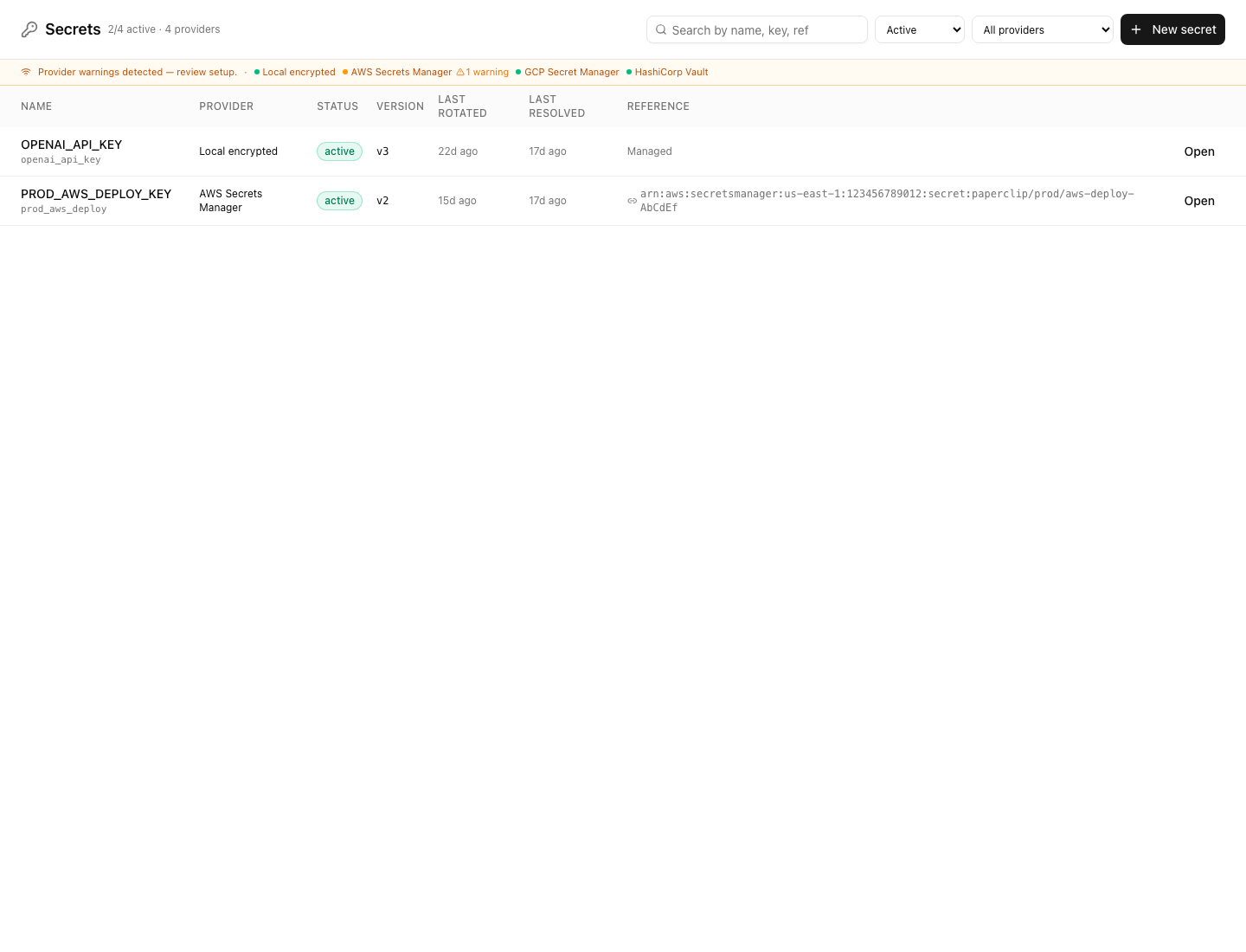 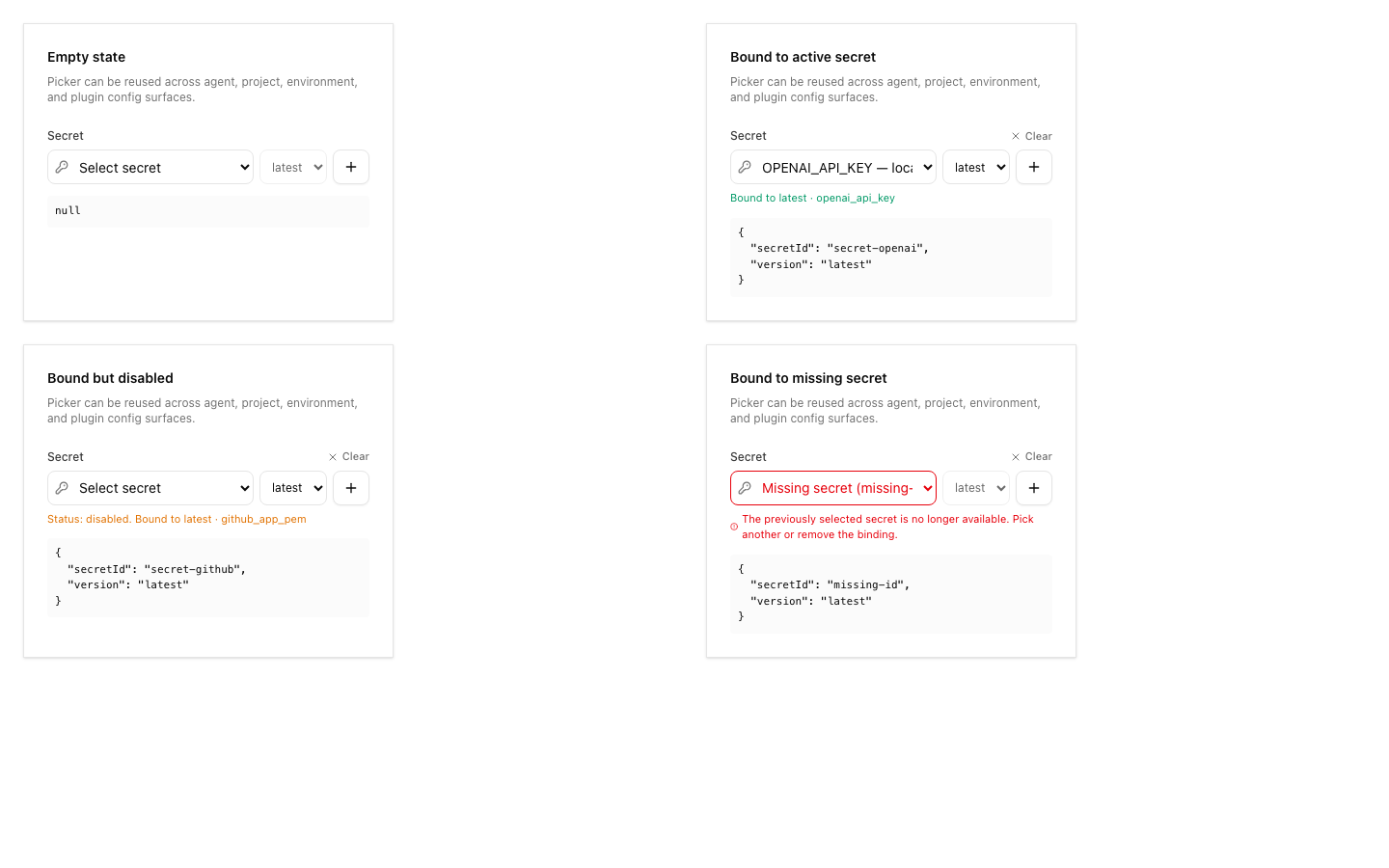 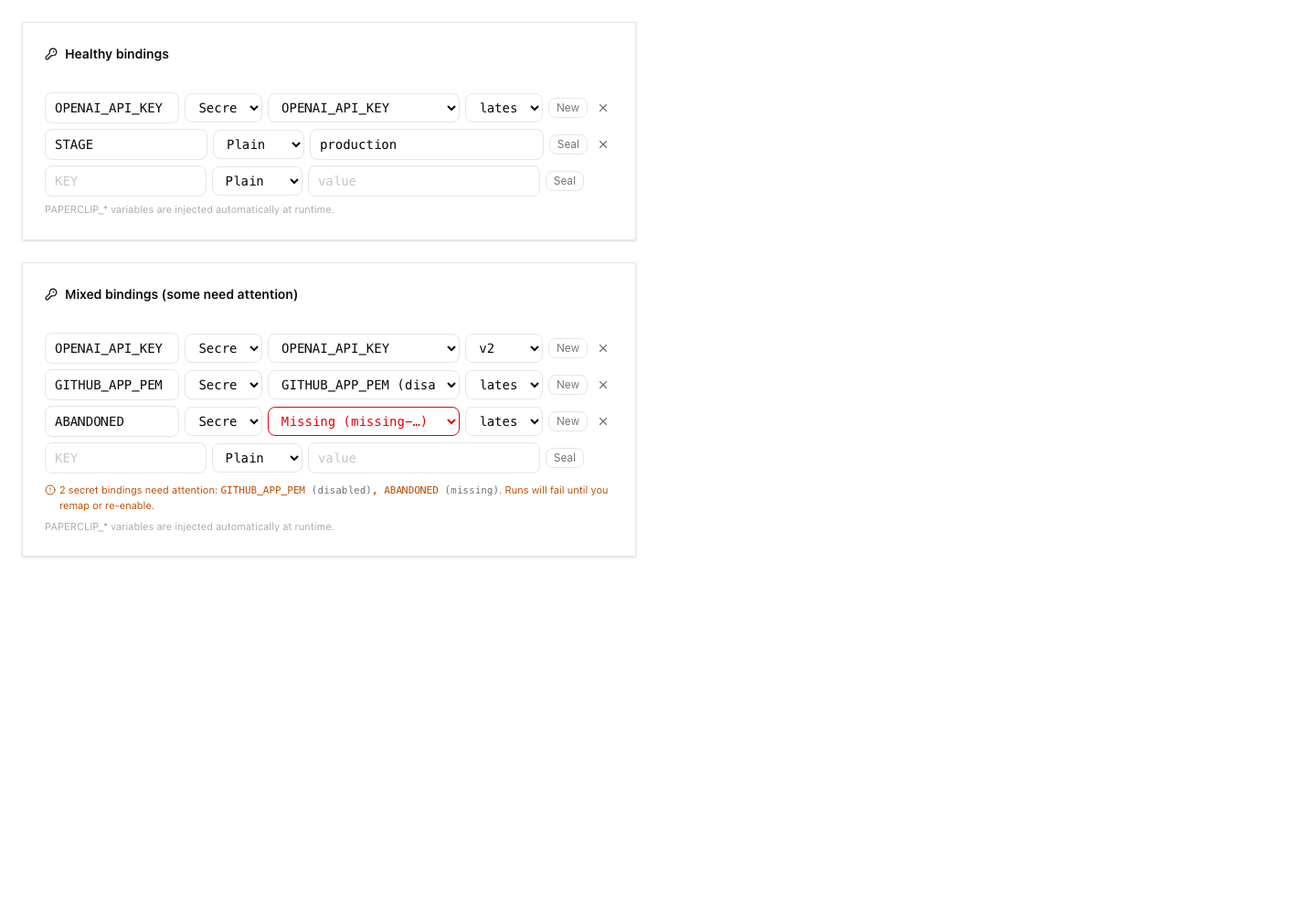 ## Risks - Migration risk: this adds new secret provider tables and extends existing secret rows. The migrations were checked for monotonic ordering and idempotent guards, but reviewers should still inspect upgrade behavior carefully. - Provider risk: AWS support uses direct SigV4 requests. Automated tests cover signing, request timeouts, vault-config selection, namespace guardrails, pending-version archival, sanitized provider errors, and service-level cleanup paths. A real-vault AWS smoke test remains deployment validation for an operator with AWS credentials rather than an unverified merge blocker in this local branch. - UI risk: the Secrets page and import dialog are large new surfaces; screenshots are included above for reviewer inspection. - Verification risk: the full local stable test command hit parallel-load timing failures, although the exact failed files passed when rerun directly. - Operational risk: remote import intentionally avoids plaintext reads; operators must understand that imported external references resolve at runtime and may fail if AWS permissions change. > For core feature work, check [`ROADMAP.md`](ROADMAP.md) first and discuss it in `#dev` before opening the PR. Feature PRs that overlap with planned core work may need to be redirected — check the roadmap first. See `CONTRIBUTING.md`. ## Model Used - OpenAI Codex, GPT-5 coding agent with local shell/tool use in the Paperclip worktree. Exact context-window size was not exposed by the runtime. ## Checklist - [x] I have included a thinking path that traces from project context to this change - [x] I have specified the model used (with version and capability details) - [x] I have checked ROADMAP.md and confirmed this PR does not duplicate planned core work - [ ] I have run tests locally and they pass - [x] I have added or updated tests where applicable - [x] If this change affects the UI, I have included before/after screenshots - [x] I have updated relevant documentation to reflect my changes - [x] I have considered and documented any risks above - [x] I will address all Greptile and reviewer comments before requesting merge --------- Co-authored-by: Paperclip <noreply@paperclip.ing> Co-authored-by: Claude Sonnet 4.6 <noreply@anthropic.com>



233 lines
7.6 KiB
Markdown
233 lines
7.6 KiB
Markdown
# CLI Reference
|
|
|
|
Paperclip CLI now supports both:
|
|
|
|
- instance setup/diagnostics (`onboard`, `doctor`, `configure`, `env`, `allowed-hostname`, `env-lab`)
|
|
- control-plane client operations (issues, approvals, agents, activity, dashboard)
|
|
|
|
## Base Usage
|
|
|
|
Use repo script in development:
|
|
|
|
```sh
|
|
pnpm paperclipai --help
|
|
```
|
|
|
|
First-time local bootstrap + run:
|
|
|
|
```sh
|
|
pnpm paperclipai run
|
|
```
|
|
|
|
Choose local instance:
|
|
|
|
```sh
|
|
pnpm paperclipai run --instance dev
|
|
```
|
|
|
|
## Deployment Modes
|
|
|
|
Mode taxonomy and design intent are documented in `doc/DEPLOYMENT-MODES.md`.
|
|
|
|
Current CLI behavior:
|
|
|
|
- `paperclipai onboard` and `paperclipai configure --section server` set deployment mode in config
|
|
- server onboarding/configure ask for reachability intent and write `server.bind`
|
|
- `paperclipai run --bind <loopback|lan|tailnet>` passes a quickstart bind preset into first-run onboarding when config is missing
|
|
- runtime can override mode with `PAPERCLIP_DEPLOYMENT_MODE`
|
|
- `paperclipai run` and `paperclipai doctor` still do not expose a direct low-level `--mode` flag
|
|
|
|
Canonical behavior is documented in `doc/DEPLOYMENT-MODES.md`.
|
|
|
|
Allow an authenticated/private hostname (for example custom Tailscale DNS):
|
|
|
|
```sh
|
|
pnpm paperclipai allowed-hostname dotta-macbook-pro
|
|
```
|
|
|
|
Bring up the default local SSH fixture for environment testing:
|
|
|
|
```sh
|
|
pnpm paperclipai env-lab up
|
|
pnpm paperclipai env-lab doctor
|
|
pnpm paperclipai env-lab status --json
|
|
pnpm paperclipai env-lab down
|
|
```
|
|
|
|
All client commands support:
|
|
|
|
- `--data-dir <path>`
|
|
- `--api-base <url>`
|
|
- `--api-key <token>`
|
|
- `--context <path>`
|
|
- `--profile <name>`
|
|
- `--json`
|
|
|
|
Company-scoped commands also support `--company-id <id>`.
|
|
|
|
Use `--data-dir` on any CLI command to isolate all default local state (config/context/db/logs/storage/secrets) away from `~/.paperclip`:
|
|
|
|
```sh
|
|
pnpm paperclipai run --data-dir ./tmp/paperclip-dev
|
|
pnpm paperclipai issue list --data-dir ./tmp/paperclip-dev
|
|
```
|
|
|
|
## Context Profiles
|
|
|
|
Store local defaults in `~/.paperclip/context.json`:
|
|
|
|
```sh
|
|
pnpm paperclipai context set --api-base http://localhost:3100 --company-id <company-id>
|
|
pnpm paperclipai context show
|
|
pnpm paperclipai context list
|
|
pnpm paperclipai context use default
|
|
```
|
|
|
|
To avoid storing secrets in context, set `apiKeyEnvVarName` and keep the key in env:
|
|
|
|
```sh
|
|
pnpm paperclipai context set --api-key-env-var-name PAPERCLIP_API_KEY
|
|
export PAPERCLIP_API_KEY=...
|
|
```
|
|
|
|
## Company Commands
|
|
|
|
```sh
|
|
pnpm paperclipai company list
|
|
pnpm paperclipai company get <company-id>
|
|
pnpm paperclipai company delete <company-id-or-prefix> --yes --confirm <same-id-or-prefix>
|
|
```
|
|
|
|
Examples:
|
|
|
|
```sh
|
|
pnpm paperclipai company delete PAP --yes --confirm PAP
|
|
pnpm paperclipai company delete 5cbe79ee-acb3-4597-896e-7662742593cd --yes --confirm 5cbe79ee-acb3-4597-896e-7662742593cd
|
|
```
|
|
|
|
Notes:
|
|
|
|
- Deletion is server-gated by `PAPERCLIP_ENABLE_COMPANY_DELETION`.
|
|
- With agent authentication, company deletion is company-scoped. Use the current company ID/prefix (for example via `--company-id` or `PAPERCLIP_COMPANY_ID`), not another company.
|
|
|
|
## Issue Commands
|
|
|
|
```sh
|
|
pnpm paperclipai issue list --company-id <company-id> [--status todo,in_progress] [--assignee-agent-id <agent-id>] [--match text]
|
|
pnpm paperclipai issue get <issue-id-or-identifier>
|
|
pnpm paperclipai issue create --company-id <company-id> --title "..." [--description "..."] [--status todo] [--priority high]
|
|
pnpm paperclipai issue update <issue-id> [--status in_progress] [--comment "..."]
|
|
pnpm paperclipai issue comment <issue-id> --body "..." [--reopen]
|
|
pnpm paperclipai issue checkout <issue-id> --agent-id <agent-id> [--expected-statuses todo,backlog,blocked]
|
|
pnpm paperclipai issue release <issue-id>
|
|
```
|
|
|
|
## Agent Commands
|
|
|
|
```sh
|
|
pnpm paperclipai agent list --company-id <company-id>
|
|
pnpm paperclipai agent get <agent-id>
|
|
pnpm paperclipai agent local-cli <agent-id-or-shortname> --company-id <company-id>
|
|
```
|
|
|
|
`agent local-cli` is the quickest way to run local Claude/Codex manually as a Paperclip agent:
|
|
|
|
- creates a new long-lived agent API key
|
|
- installs missing Paperclip skills into `~/.codex/skills` and `~/.claude/skills`
|
|
- prints `export ...` lines for `PAPERCLIP_API_URL`, `PAPERCLIP_COMPANY_ID`, `PAPERCLIP_AGENT_ID`, and `PAPERCLIP_API_KEY`
|
|
|
|
Example for shortname-based local setup:
|
|
|
|
```sh
|
|
pnpm paperclipai agent local-cli codexcoder --company-id <company-id>
|
|
pnpm paperclipai agent local-cli claudecoder --company-id <company-id>
|
|
```
|
|
|
|
## Secrets Commands
|
|
|
|
```sh
|
|
pnpm paperclipai secrets list --company-id <company-id>
|
|
pnpm paperclipai secrets declarations --company-id <company-id> [--include agents,projects] [--kind secret]
|
|
pnpm paperclipai secrets create --company-id <company-id> --name anthropic-api-key --value-env ANTHROPIC_API_KEY
|
|
pnpm paperclipai secrets link --company-id <company-id> --name prod-stripe-key --provider aws_secrets_manager --external-ref <provider-ref>
|
|
pnpm paperclipai secrets doctor --company-id <company-id>
|
|
pnpm paperclipai secrets migrate-inline-env --company-id <company-id> [--apply]
|
|
```
|
|
|
|
Secret listing and declarations never print secret values. `create` accepts
|
|
`--value-env` so shell history does not capture the value. `link` records
|
|
provider-owned references without copying the secret value into Paperclip.
|
|
For AWS-backed secrets, `secrets doctor` reports missing non-secret provider
|
|
env and the expected AWS SDK runtime credential source; do not store AWS
|
|
bootstrap credentials in Paperclip secrets.
|
|
|
|
Per-company provider vaults (multiple vault instances per provider, default
|
|
vault selection, coming-soon GCP/Vault) are configured from the board UI under
|
|
`Company Settings → Secrets → Provider vaults` or through
|
|
`/api/companies/{companyId}/secret-provider-configs`. There is no CLI surface
|
|
for vault management today. See the
|
|
[secrets deploy guide](../docs/deploy/secrets.md#provider-vaults) and
|
|
[API reference](../docs/api/secrets.md#provider-vaults) for the contract.
|
|
|
|
## Approval Commands
|
|
|
|
```sh
|
|
pnpm paperclipai approval list --company-id <company-id> [--status pending]
|
|
pnpm paperclipai approval get <approval-id>
|
|
pnpm paperclipai approval create --company-id <company-id> --type hire_agent --payload '{"name":"..."}' [--issue-ids <id1,id2>]
|
|
pnpm paperclipai approval approve <approval-id> [--decision-note "..."]
|
|
pnpm paperclipai approval reject <approval-id> [--decision-note "..."]
|
|
pnpm paperclipai approval request-revision <approval-id> [--decision-note "..."]
|
|
pnpm paperclipai approval resubmit <approval-id> [--payload '{"...":"..."}']
|
|
pnpm paperclipai approval comment <approval-id> --body "..."
|
|
```
|
|
|
|
## Activity Commands
|
|
|
|
```sh
|
|
pnpm paperclipai activity list --company-id <company-id> [--agent-id <agent-id>] [--entity-type issue] [--entity-id <id>]
|
|
```
|
|
|
|
## Dashboard Commands
|
|
|
|
```sh
|
|
pnpm paperclipai dashboard get --company-id <company-id>
|
|
```
|
|
|
|
## Heartbeat Command
|
|
|
|
`heartbeat run` now also supports context/api-key options and uses the shared client stack:
|
|
|
|
```sh
|
|
pnpm paperclipai heartbeat run --agent-id <agent-id> [--api-base http://localhost:3100] [--api-key <token>]
|
|
```
|
|
|
|
## Local Storage Defaults
|
|
|
|
Default local instance root is `~/.paperclip/instances/default`:
|
|
|
|
- config: `~/.paperclip/instances/default/config.json`
|
|
- embedded db: `~/.paperclip/instances/default/db`
|
|
- logs: `~/.paperclip/instances/default/logs`
|
|
- storage: `~/.paperclip/instances/default/data/storage`
|
|
- secrets key: `~/.paperclip/instances/default/secrets/master.key`
|
|
|
|
Override base home or instance with env vars:
|
|
|
|
```sh
|
|
PAPERCLIP_HOME=/custom/home PAPERCLIP_INSTANCE_ID=dev pnpm paperclipai run
|
|
```
|
|
|
|
## Storage Configuration
|
|
|
|
Configure storage provider and settings:
|
|
|
|
```sh
|
|
pnpm paperclipai configure --section storage
|
|
```
|
|
|
|
Supported providers:
|
|
|
|
- `local_disk` (default; local single-user installs)
|
|
- `s3` (S3-compatible object storage)
|